A blood pressure diary for Chrome & Telegram

Your readings.
A clearer picture.

Record your blood pressure, see your history, and prepare a report for your next appointment.

No account. Stored locally by default.
No automatic sync. Data boundaries.

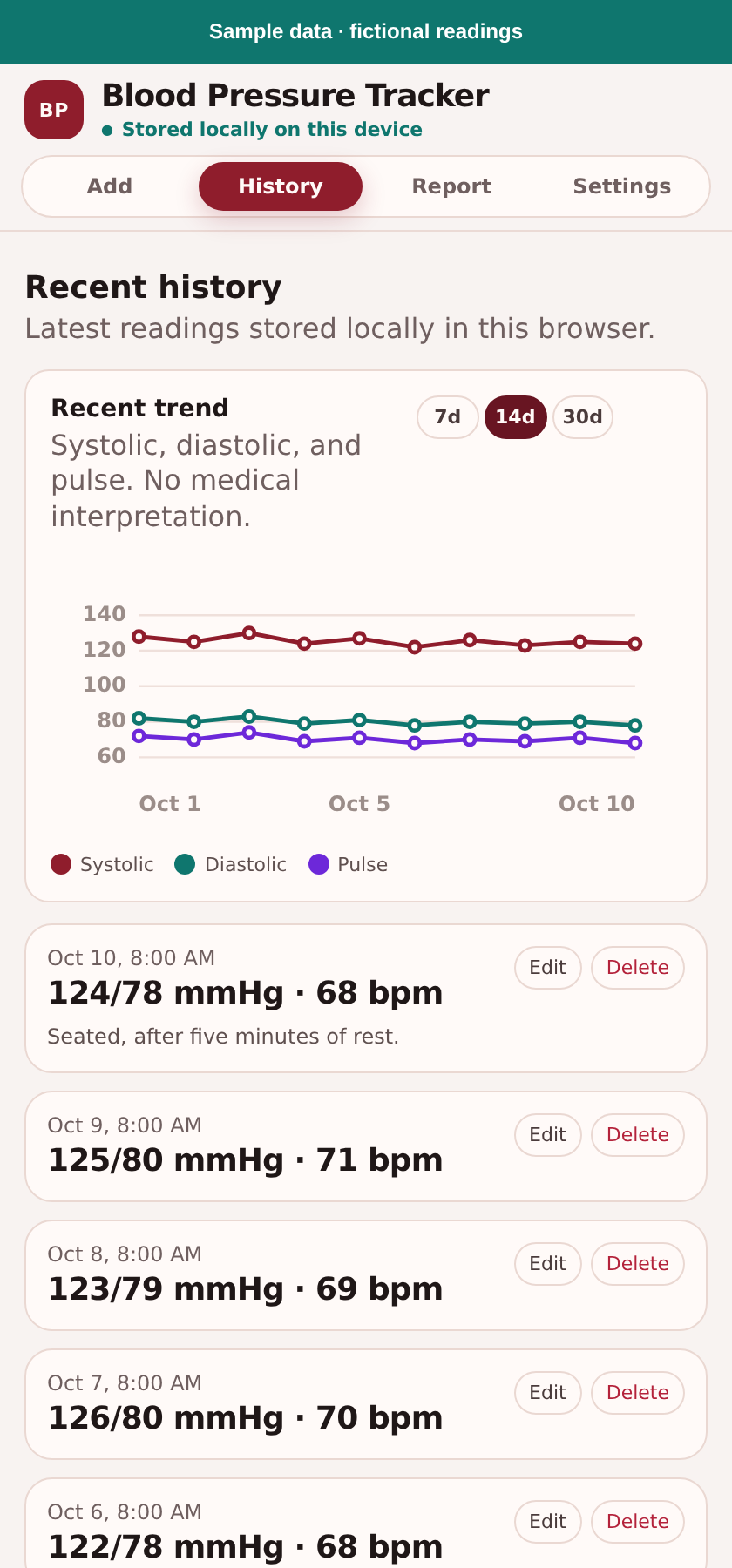
Blood Pressure Tracker · History
Actual Chrome diary History screen with sample readings and trend chart

Real Chrome interface · sample data · detail cropped for this preview

A simple routine.
A useful record.

You measure with a blood pressure monitor.
The diary helps you keep what happens next in one place.

Record your reading

Save blood pressure and pulse. Add a note for context.

See your history

Review saved readings and follow the chart over time.

Bring a clear report

Prepare a readable summary to print or discuss at your appointment.

From daily readings to your next appointment

A useful record.
Ready to share.

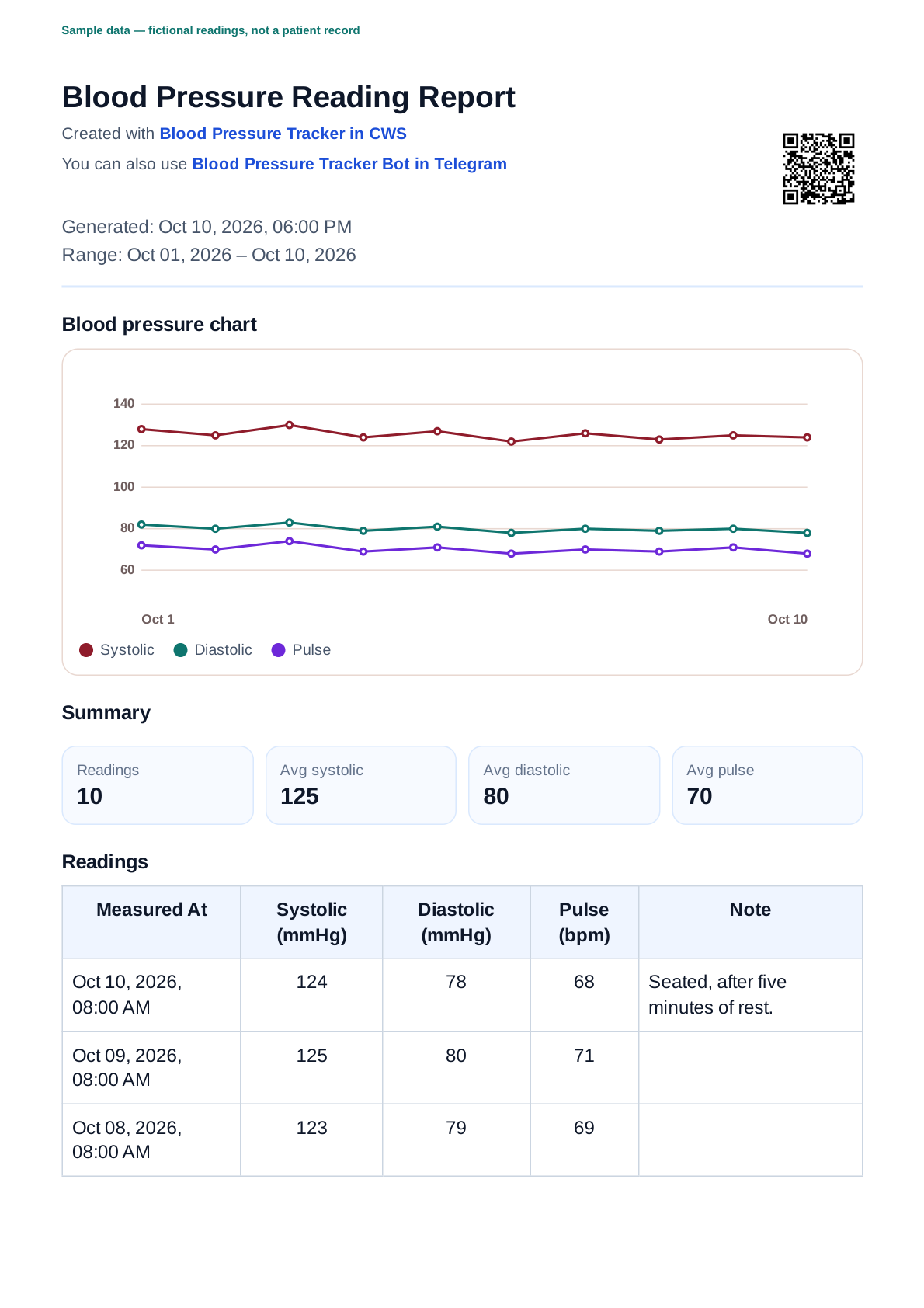
A chart, saved readings, and notes — together in a report you can review and bring to your clinician.

Open the sample PDF ↗

This sample was generated by the Chrome diary. Report options differ by platform.

First full page of the actual Chrome PDF report using synthetic sample data

Actual report · sample data · page 1 of 2

Your data, with clear boundaries

Local by default.
Not automatically synced.

Routine diary use keeps readings on your device. There’s no account and no automatic sync between Chrome and Telegram.

Some Telegram report and export actions use server processing when you request them.

Read the data boundaries →
Practical measurement guidance

Good records start
with careful measurement.

Learn why checks matter, what the two numbers mean, and how to prepare for a home measurement.

Official WHO and NHS sources; general adult education, not personal medical advice.

Read the measurement guide →

What the two numbers mean
How to measure at home

Start with your next reading.

Choose where you want to keep your diary.

The adult guide

Understand and measure your blood pressure

Start with the reading. Not the app.

Why check your blood
pressure regularly?

Feeling well is not the whole picture.

You can feel well and still have high blood pressure. It usually has no symptoms; a blood pressure check is how you find out. [1] [2]

Untreated high blood pressure can damage the heart and kidneys and contribute to stroke. Checks help make an otherwise unseen problem visible. [1]

Two numbers.
One reading.

The first number (systolic, or SYS) is pressure when the heart beats. The second (diastolic, or DIA) is pressure when the heart rests between beats. Blood pressure is expressed in millimetres of mercury (mmHg). [1] [2]

SYS128First number
DIA82Second number
mmHg

Illustrative numbers only, not a target or a health assessment. Interpretation depends on the setting and the person; ask a healthcare professional about your readings.

Give your reading
a good starting point.

A calm setup. A supported arm. A written record.

The steps below follow the NHS-hosted NIHR / British Hypertension Society guide. General adult guidance; children, pregnancy and individual medical needs require tailored advice.

5 min of restAt least five minutes, sitting quietly.
2 readings · 1 min apartAt least two readings, at least one minute apart.
[3]
  1. Choose your setup

    Use an upper-arm blood pressure monitor and follow its instructions for fitting the cuff. Use the arm your doctor or nurse asks you to use. Avoid tight clothing around that arm. [2] [3]

  2. Take time to settle

    For 30 minutes beforehand, avoid smoking, caffeine and exercise. Use the toilet if you need to. Then sit quietly and rest for at least five minutes. [3]

  3. Get comfortably seated

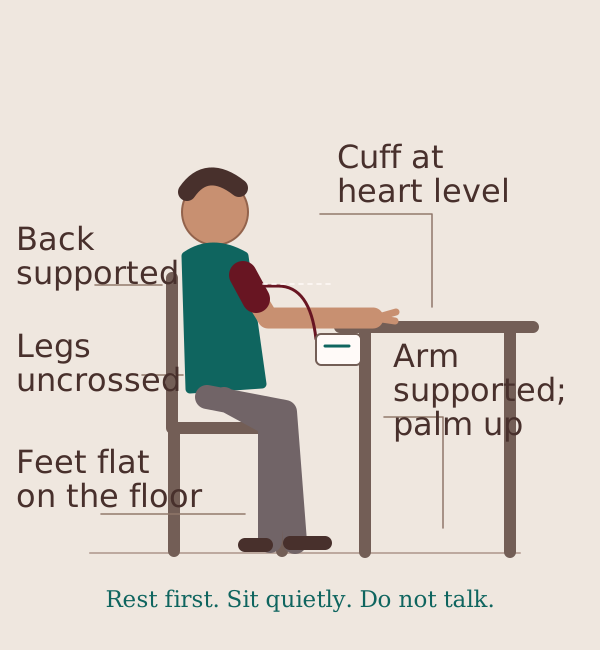
    Sit with your back supported, feet flat on the floor and legs uncrossed. Rest your arm on a firm surface, palm upwards, with the cuff at heart level. [3]

  4. Measure, pause, record

    Stay relaxed and do not talk during the reading. Take at least two readings, at least one minute apart. Write down the exact numbers for each reading rather than rounding them. [3]

Seated measurement position: back supported by a chair, feet flat and legs uncrossed, palm up on a table with upper-arm cuff at heart level.
Back supported; feet flat, legs uncrossed; arm supported, palm up; cuff at heart level. [3]

Do not wait for the diary if you are unwell or have worrying symptoms. Seek medical help; see WHO’s symptoms and urgent-care guidance, and use your local emergency service when needed. [1]

A record you can
come back to.

Keep your readings to share with your healthcare professional. Home measurements do not replace a professional assessment. [1] [2] [3]

Paper is a perfectly good place to start. If you prefer a digital diary, Blood Pressure Tracker keeps readings, pulse, dates and notes together and helps you prepare a report.

The diary does not measure blood pressure. It records the numbers from your own monitor. It does not diagnose a condition or recommend treatment.

Explore the blood pressure diary →

Privacy / the boundaries

Your record.
Your decisions.

Local-first does not mean that nothing ever leaves your device. Here is what stays local and what happens when you choose to share.

This educational website

The website has no diary, health-data form, account, analytics tracker or third-party runtime scripts. Viewing the guide does not transfer readings from either diary. Product links open the Chrome Web Store or Telegram without attaching your readings or Telegram identity.

Like other websites, hosting receives technical connection information, including your IP address and browser details. Hosting and reverse-proxy technical logs may record requests. We do not promise that these logs do not exist. Following an external link puts you under that service’s policies.

Chrome: ordinary local use

Readings and settings are stored in this extension’s local browser storage (chrome.storage.local). Ordinary diary use does not upload them to a backend. Reports are generated locally; exporting or printing creates files that you control.

Telegram: ordinary local use

Readings and settings are stored in the Telegram WebView on your device, using IndexedDB with a localStorage fallback. They are not automatically synchronized with Chrome or another device.

When you create and send a report

Choosing Create and send doctor report sends selected readings, optional patient details and signed Telegram launch data to the backend. The backend uses the launch data to identify the recipient, generates the PDF and sends it to your private bot chat. This is an explicit action, not ordinary local diary use.

The report-delivery path does not persist report contents on the backend or create a public PDF URL. Telegram stores the delivered PDF until you delete it. Telegram has its own retention and privacy rules; deleting local readings does not delete that chat document.

CSV downloads and feedback

In Telegram, Download CSV sends the selected readings to the backend to create a temporary file link. The temporary download is separate from PDF delivery and is not a permanent backup. Outside the Telegram WebView, CSV generation can be local. A downloaded file remains wherever you save it.

If you send feedback in Settings, the message you type and Telegram launch data go to the backend so feedback can be delivered with limited user/technical context. Readings, notes, reports and backups are not attached automatically. Avoid putting private health information in feedback.

Mini App opens and technical information

The published Telegram Mini App uses Umami Cloud to count successful opens. Technical connection data, including IP address and browser details, can reach Umami. The sanitized open event does not include readings, notes, reports, backups, Telegram IDs or the launch URL. The educational website does not use this tracker.

Mini App hosting also receives connection information. Technical logs and client error/download events can contain narrow operational metadata; local-first is not a guarantee of zero technical logging.

No automatic sync

Chrome and Telegram maintain separate diaries. JSON import is explicit. The current Telegram WebView says JSON backup is not available in Telegram yet when export is attempted; do not assume that button has saved a backup. Chrome JSON export works locally. See Help for current limitations.

Protect the copies you keep

Clearing browser or Telegram app data, reinstalling an app, uninstalling the extension or changing devices can remove local readings. Make and verify backups where available. JSON transfers readings only, not saved patient details. CSV and PDF are reports, not a restore backup.

Exported files contain health information. Store them carefully, share only with intended recipients and consider whether your chosen file-storage location synchronizes to a cloud service. Deleting the diary does not delete exported files or Telegram documents.

Reviewed against current client code on 10 October 2026. No compliance certification is claimed.

Help / the practical bits

From a reading
to a useful record.

Take the measurement with your own monitor, then record it in the diary you choose.

FAQ

Can the app take my blood pressure?

No. You need a blood pressure monitor. The app is a diary for readings you enter yourself.

Do Chrome and Telegram sync?

No. They keep separate local diaries. Chrome can export a JSON backup for manual import; Telegram currently supports import but not JSON export inside its WebView. See Help for the limitations and the distinction between a backup and a report.

What if I lose local data?

Clearing browser or Telegram app data, uninstalling or changing devices can remove your diary. Keep a JSON backup somewhere safe. Exported files contain health information.

Where can I check the guidance?

Official references are linked beside the relevant claims. Our sources and editorial policy explain scope and review dates. The organizations cited do not endorse this app.

Getting started with the diary →
See the real diary screens (sample data)
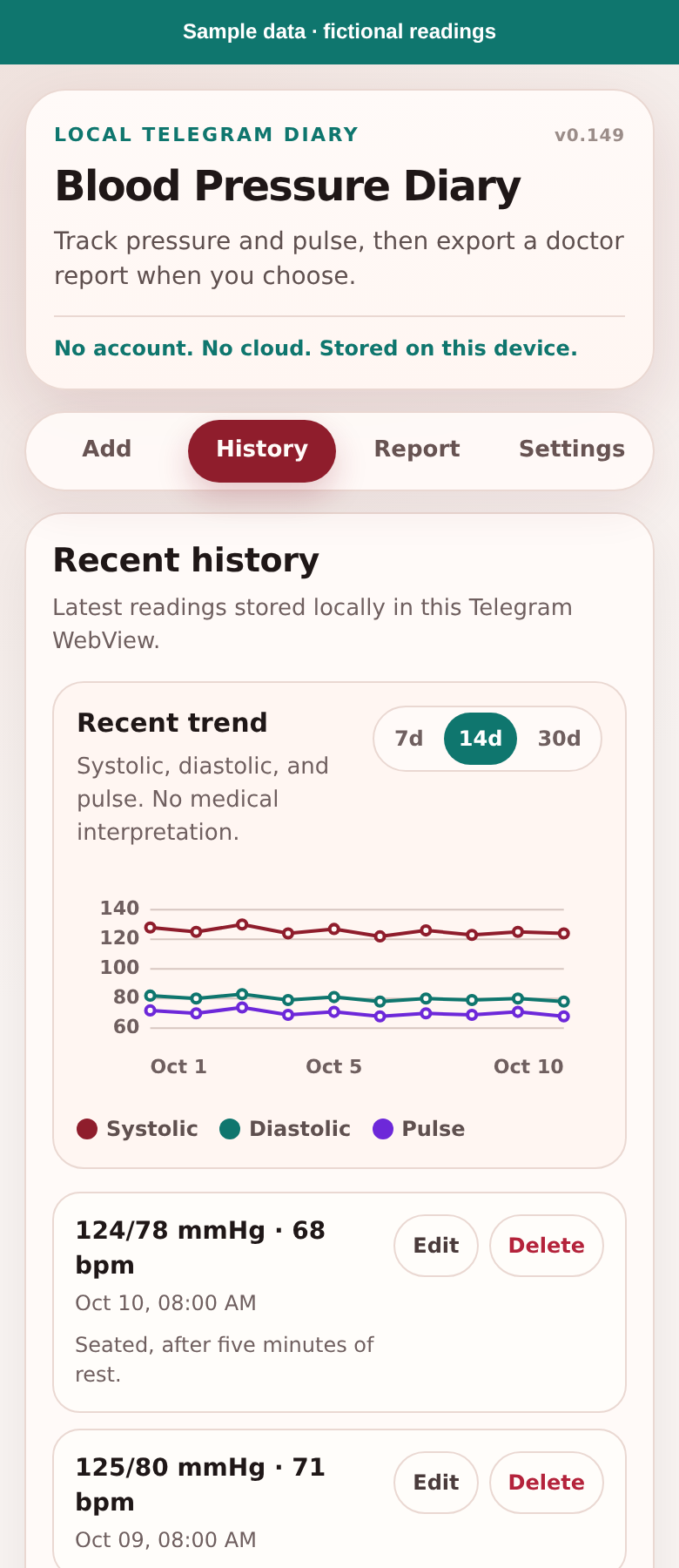
Real Telegram History screen with synthetic sample readings
Actual Telegram diary · sample data
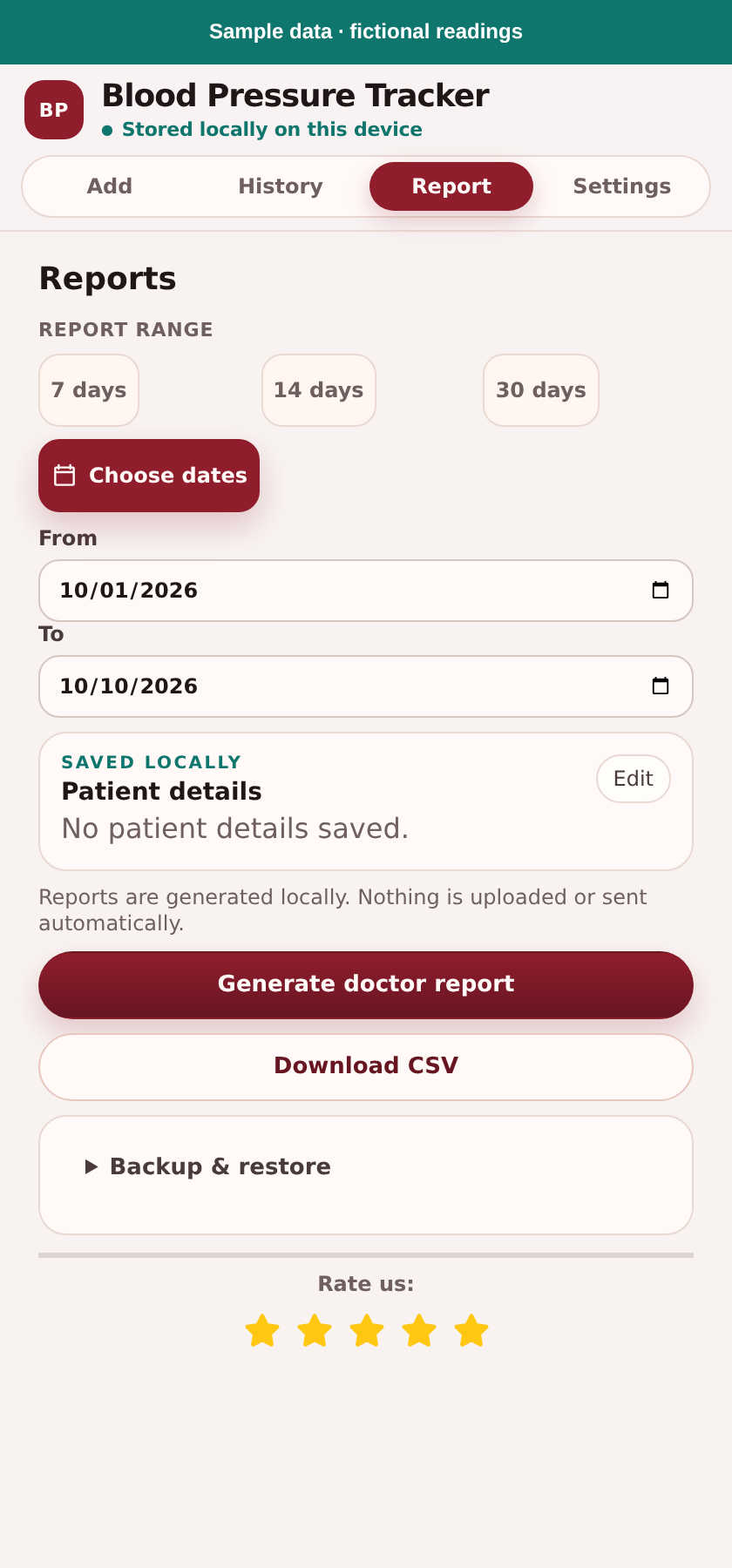
Real Chrome Report controls using synthetic sample data
Actual Chrome Report tab · sample data

Start in Chrome

  1. Install Blood Pressure Tracker from the Chrome Web Store. Open it from Chrome’s extensions menu; pin its icon if useful.
  2. In Add, enter systolic, diastolic, pulse, measurement date/time and an optional note. Choose Save reading.
  3. Use History to review readings. In Report, choose 7, 14 or 30 days, or Choose dates for a custom period.
  4. Choose Generate doctor report to open the locally generated report, then use your browser’s print options to print or save as PDF. Optional patient details are saved locally; include only what you intend to share.

Start in Telegram

  1. Open the Telegram Mini App. This is a separate diary, not a synchronized copy of Chrome.
  2. Enter your reading in Add and choose Save reading. Review it in History.
  3. In Report, choose a period, optionally add patient details and choose Create and send doctor report. Selected information goes to the backend and the PDF is sent to your private bot chat.
  4. If delivery asks you to open the bot and tap Start, do that and try again. If confirmation is uncertain, check your bot chat before retrying; a PDF may already be there.

CSV is a report. JSON is a backup.

Download CSV creates spreadsheet rows for the selected report period. It is not a full restore backup. In Telegram it uses a temporary backend download link; accepting a download handoff does not prove the file is saved. Check the saved file, or use the visible Open file now fallback when offered.

In Chrome’s Report → Backup & restore, choose Export JSON backup to save your readings. Keep the file somewhere safe and verify it exists. Choose Import JSON backup in the other diary and select the file; review the import result. JSON transfers readings only, not saved patient details. There is no automatic sync.

If your data disappears

Local storage can be cleared by app/browser settings, uninstalling or changing devices. Import a previously saved JSON backup if you have one. This website cannot recover local readings or inspect your diary.

Need product help?

Telegram’s Settings includes a feedback form. No readings are attached automatically; avoid including private health information in your message. For medical questions, contact a healthcare professional rather than product support.

Understand exports, storage and retention →
Return to the measurement guide →

The references

Read the source.
Know the scope.

Official guidance behind this adult education guide, with the limits kept in view.

[1] · Global · World Health Organization

Hypertension ↗

A global overview of hypertension: why checks matter even without symptoms, what the two numbers represent, and the consequences of uncontrolled high blood pressure. Used for the reason to check and the limits of home records, not to set individual targets.

Full text checked: 2026-10-10. Source publication/review: 25 September 2025.

[2] · UK · NHS

Blood pressure test ↗

UK guidance on why a blood pressure test is done, how systolic and diastolic numbers are described, and clinician-directed home monitoring. Used for the numbers and checking schedule; UK diagnostic thresholds are not reproduced in this guide.

Full text checked: 2026-10-10. Source publication/review: 25 November 2025.

[3] · UK · NHS / Quedgeley Medical Centre

Taking Your Blood Pressure At Home ↗

Our baseline for the adult measurement steps and posture illustration. A joint NIHR CLAHRC Greater Manchester / British Hypertension Society resource hosted by Quedgeley Medical Centre, covering preparation, seated support, cuff placement, repeat readings and exact recording. Follow your own device instructions and clinician’s advice.

Full text checked: 2026-10-10. Source publication/review: not stated in the document.

How we handle the content

We read full official sources, map each medical claim to its source, and paraphrase rather than reproduce articles. Automated checks verify those links and block drafts; they do not replace a human check of meaning.

This is general education for adults, not individual advice. We do not mix national diagnostic thresholds or publish a universal daily checking schedule. Our positioning guide is UK-based; follow your own clinician and device instructions. Children and pregnancy are outside this general guide.

Sources are reviewed at least every six months and when guidance changes. Last factual verification: 10 October 2026. No medical reviewer is claimed. References do not imply WHO, NHS or other organizational endorsement of Blood Pressure Tracker.

Return to the measurement guide →